
Training matrix: What it is and how to use it [+examples]
Employee training is crucial for any organization's success, as companies with highly engaged employees report benefits like 23% higher profitability and 14% higher productivity. Keeping track of who needs training, what kind of training they need, and when they need it can be overwhelming. That's where a training matrix comes in handy. A training matrix helps organize and track your training efforts efficiently, ensuring that every team member gets the training they need when they need it.
What is a training matrix?
A training matrix is a tool that visually represents the training requirements, skills, and competencies of employees within an organization. It typically displays the employees on one axis and the required skills or training modules on the other, allowing for an easy overview of who has been trained and who needs further development.
Key components of a training matrix
Employees: Listed on one axis, showing everyone in the organization or department.
Skills/Training Modules: Listed on the other axis, detailing the necessary skills or training courses.
Status Indicators: Symbols or color codes indicating whether the training is completed, in progress, or not started.
Dates and Frequencies: Information about when training was completed and how often it needs to be refreshed.
Benefits of using a training matrix
Organized training plans: Simplifies planning by clearly showing training needs and enabling effective resource allocation
Progress tracking: Easily monitor who has completed training and track individual and team progress
Skill gap identification: Quickly identify areas needing additional training to enhance overall team competency
Compliance assurance: Ensure regulatory training is completed on time with clear activity records
Enhanced communication: Provide a centralized view that fosters transparency across the organization
Why your company needs a training matrix
A training matrix is more than just an organizational tool—it's a strategic asset that provides a clear view of your organization's capabilities. This visualization helps you make informed decisions about workforce planning, project staffing, and risk management.
Key strategic benefits:
Compliance assurance: Ensure industry regulations are met proactively
Gap identification: Address skill gaps before they impact performance
Targeted development: Align training with career goals and business objectives
Training matrix example
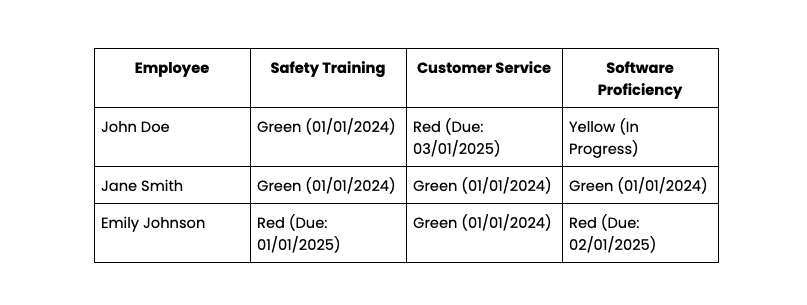
Let's look at a sample training matrix to understand its components and usage better.
Detailed breakdown of a sample training matrix
Employees: John Doe, Jane Smith, Emily Johnson.
Skills/Training Modules: Safety Training, Customer Service, Software Proficiency.
Status Indicators: Completed (Green), In Progress (Yellow), Not Started (Red).
Dates: Last completed on, next due date.
How to interpret and use the information in the matrix
Identify Training Needs: Quickly see who needs training in specific areas.
Track Progress: Monitor the status of each employee's training.
Schedule Training: Plan future training sessions based on due dates.
How to use a training matrix
Step-by-step guide on implementing a training matrix
Identify Training Needs: List all the required skills and training modules.
List Employees: Include every employee or team member who needs training.
Create the Matrix: Set up a table with employees on one axis and skills/training modules on the other.
Fill in Training Data: Use status indicators to show which training modules have been completed by each employee.
Regular Updates: Keep the matrix updated as employees complete training or as new training requirements emerge.
Best practices for maintaining and updating the matrix
Regular reviews
Schedule periodic reviews to ensure the matrix is up-to-date. Regular audits help in identifying outdated information, adjusting training plans, and ensuring that new training requirements are incorporated promptly.
Involve management
Get buy-in from management to emphasize the importance of maintaining the matrix, especially since managers and team leaders account for 70% of the variance in team engagement. When leadership supports and values the training matrix, it underscores its significance, encouraging consistent use and updates throughout the organization.
Employee engagement
Encourage employees to take ownership of their training progress, which is especially important when research shows that only 21% of employees worldwide are engaged at work. By involving employees in the process and making the matrix accessible to them, you promote a culture of continuous learning and personal development. This engagement also helps in keeping the matrix current and relevant.
Tips for getting buy-in from management and employees
Demonstrate value
Show how the matrix can streamline training processes and improve productivity. Present case studies or examples where a training matrix has led to measurable improvements in efficiency and performance, making a compelling case for its adoption.
Ease of use
Ensure the matrix is user-friendly and accessible to everyone involved. Simplify the interface and provide targeted training on how to use the matrix, so that both managers and employees find it easy to navigate and update, reducing resistance to its implementation.
Highlight benefits
Emphasize the benefits, such as compliance, skill development, and career growth. Explain how the training matrix not only helps in meeting regulatory requirements but also supports personal and professional development, enhancing overall job satisfaction and career progression.
Creating Your Own Training Matrix
When creating your own training matrix, choose from several tool options based on your needs.
Spreadsheets
Best For: Manual, customizable matrices
Examples: Excel, Google Sheets
Specialized Software
Best For: Automated tracking, advanced features
Examples: Smartsheet, Trello, LMS platforms
Key Design Considerations
Customization: Fit your specific training needs and organizational structure
Scalability: Grow with your organization
Accessibility: Ensure all stakeholders can use it easily
Common Pitfalls to Avoid
Overcomplication: Keep the matrix simple and intuitive
Inconsistent Updates: Establish regular update schedules
Poor Engagement: Foster commitment from employees and management
Measuring the impact of your training matrix
Essential KPIs to track:
Completion rates: Percentage of employees who completed required training
Skill improvement: Proficiency level changes over time
Compliance rates: Adherence to regulatory training requirements
Gap analysis and needs assessment:
Identify gaps: Pinpoint areas lacking adequate training coverage
Plan accordingly: Develop targeted training programs based on identified gaps
Future planning: Determine upcoming training needs and resource requirements
ROI calculation:
Cost comparison: Compare training costs with performance improvements
Performance metrics: Link training completion to productivity, quality, and retention; for example, highly engaged teams see significantly lower turnover and 32% fewer quality defects.
Value demonstration: Show concrete business impact of training investments
Power your training strategy with an AI source of truth
A training matrix is a powerful tool, but its value multiplies when it becomes part of a living, intelligent knowledge ecosystem. Static spreadsheets can quickly become outdated, creating risk and confusion. By connecting your training data to an AI Source of Truth like Guru, you transform it from a simple tracking document into a dynamic part of your company brain. This allows your AI Knowledge Agent to deliver trusted, permission-aware answers about employee skills, certifications, and training needs directly in the flow of work. When you need to find the right expert for a project or verify compliance, you get an instant, reliable answer. Ready to see how it works? Watch a demo.
Key takeaways 🔑🥡🍕
What are the 4 levels of a skill matrix?
What is the matrix model of training?
How often should a training matrix be updated?
What is matrix training system?
The matrix training system refers to a structured approach using a training matrix to organize, track, and manage the training and development of employees within an organization.
What is a training matrix with an example?
A training matrix is a chart that shows employees against required skills or training, indicating completion status. For example, it can show that "John Doe" has completed "Safety Training" but still needs "Software Proficiency" training.
How do you create a training activity matrix?
To create a training activity matrix, list employees on one axis and required skills or training modules on the other, then mark each cell with the training status for each employee.
What is an example of a matrix training system?
An example of a matrix training system is a company-wide Excel sheet where each employee’s name is listed alongside the required trainings, with indicators showing completed or pending status.
Why do you need a training matrix?
A training matrix helps organize and track employee training, ensuring that all necessary skills are developed, compliance is met, and gaps in knowledge are addressed.
How to create a training matrix?
To create a training matrix, identify the training needs, list the employees and required training modules, and use a grid format to track the status of each employee's training.


